
How fast does the broadband need to be for IPTV?
Start with practical HD and 4K bandwidth allowances, compare official streaming recommendations, and test the connection where your telly sits.
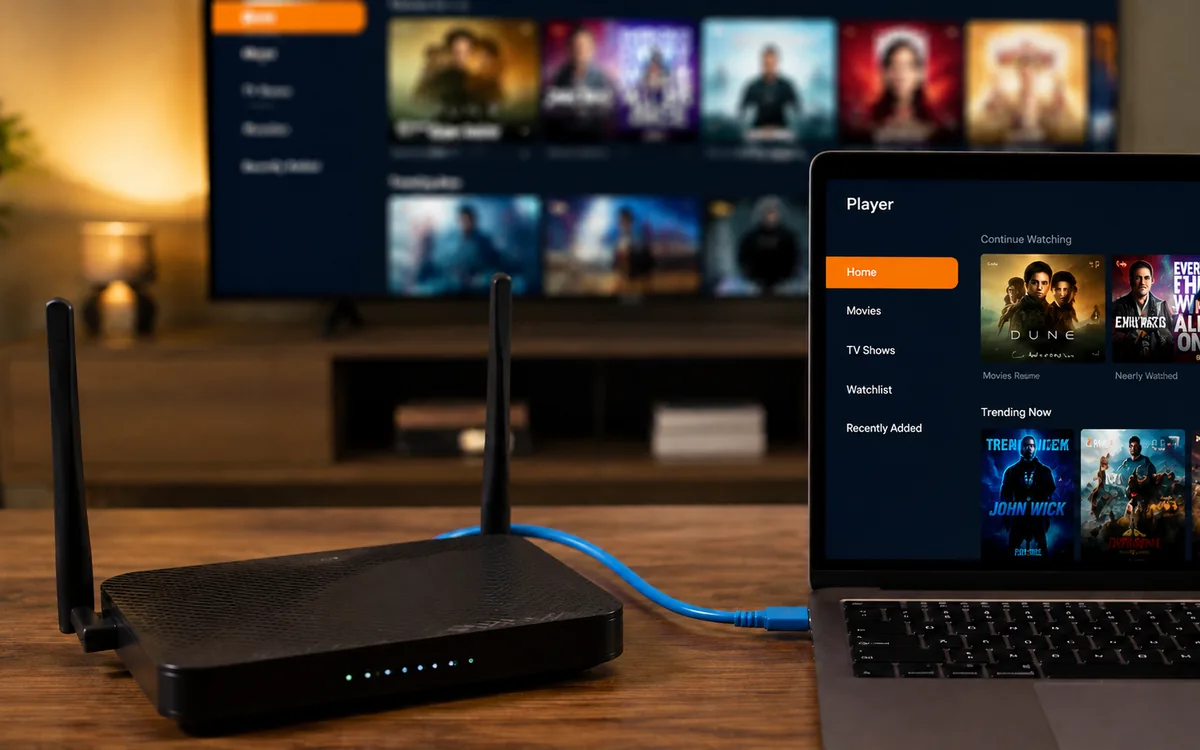
Check BingeBear on your own telly before paying.
Start a free 24-hour trial with no card. Check your channels, supported player and device, then read the current plans and activation terms.
For a first IPTV test, allow about 10 Mbps for one HD stream or 25 Mbps for one 4K stream, measured where your telly connects. These are planning targets with some headroom, not universal minimums or a promise of uninterrupted playback. The actual requirement depends on the stream's bitrate, your player, the connection to your router and what else is using the broadband. Test the exact device and programme at the time you normally watch.
For context, Netflix recommends 5 Mbps for its 1080p streams and 15 Mbps for its 4K streams. YouTube recommends 5 Mbps and 20 Mbps respectively. Those are each provider's own figures, not measurements of BingeBear. The comparison below links to both original sources.
Start with a free 24-hour trial, with no card needed. For subscription prices, activation charges and separate-account options, use the current Ireland pricing and terms. A speed test does not confirm that a particular channel or programme is available; ask Joe about anything essential before paying.
planning bandwidth for IPTV in Ireland
An advertised broadband speed is only a starting point. Check the connection on the device you will actually use, then try playback. A phone beside the router can produce a different result from a streaming stick behind the telly in another room.
Use the 10 Mbps HD and 25 Mbps 4K figures above as a practical first-test allowance per stream. If your player offers a lower-quality version, compare it with the higher-quality stream. Record whether the problem affects one channel, every channel or other streaming apps too. This gives support something useful to investigate.
There is no single ping cutoff that guarantees smooth IPTV, and this guide does not set a universal upload-speed minimum. Download capacity, connection stability, Wi-Fi reception, the device and the stream itself all need consideration.
published streaming speeds by picture quality
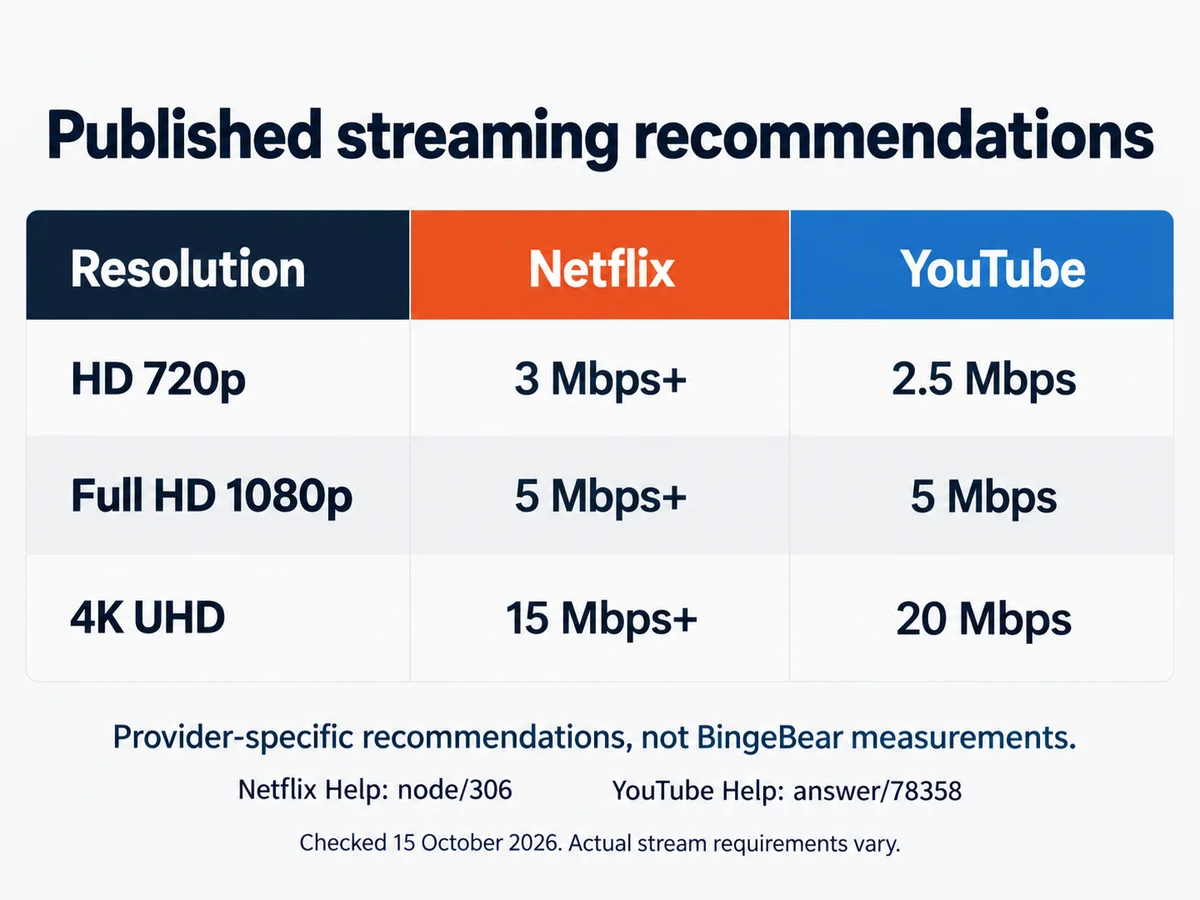
Resolution alone does not determine bandwidth: encoding and bitrate also matter. The official figures below show why a claim such as “all 4K needs at least 25 Mbps” would be too broad.
| Resolution | Netflix recommended speed | YouTube recommended sustained speed |
|---|---|---|
| SD 480p | Not listed | 1.1 Mbps |
| HD 720p | 3 Mbps or higher | 2.5 Mbps |
| Full HD 1080p | 5 Mbps or higher | 5 Mbps |
| 4K UHD | 15 Mbps or higher | 20 Mbps |
The SD 480p figure is YouTube's own recommendation. Netflix's linked speed table starts at HD 720p and does not state an SD recommendation. A stream's actual bitrate can differ, so test any SD option on the service and device you use.
Sources checked 15 October 2026: Netflix's recommended internet speeds and YouTube's system requirements. These recommendations apply to their own services. BingeBear's actual stream bitrates and a controlled comparison against other providers have not been measured for this guide.
Choose the quality that works consistently on your device. A higher advertised line speed does not prove that every stream, router or player will work well, and an occasional speed test is not a playback guarantee.
codecs, frame rates and actual stream bitrate
A codec is the format used to encode video, such as H.264/AVC, H.265/HEVC or AV1. The viewing app and device need to support the stream's format. Frame rate is the number of pictures shown each second. Two streams with the same resolution can have different bitrates because their codec, frame rate, picture detail and encoder settings differ. A codec label alone does not establish a fixed bandwidth saving.
YouTube's live-encoder guidance separates bitrate recommendations by codec, resolution and frame rate. Those figures are upload settings for people creating YouTube live streams, not BingeBear viewing-speed requirements. They should not be copied into an IPTV download-speed table.
For a 25/30 fps versus 50/60 fps comparison, check the actual versions available on your device rather than assuming that twice the frame rate needs exactly twice the broadband speed. If the player displays codec, resolution, frame rate and bitrate, note them alongside the playback result. BingeBear has not supplied measured stream profiles for this guide, so there is no verified BingeBear-specific codec or sports-bitrate table here.
On supported Fire TV devices, turn on Advanced Options in Amazon's Developer Tools. Its multimedia panel can show codec, input bitrate, resolution, frame rate and dropped frames when the player uses Android MediaCodec APIs. This option is unavailable on the first-generation Fire TV Stick. Record any available readings alongside the device, app, channel, time and playback result. System X-Ray's Network panel measures device or app download traffic; it is not a universal stream-bitrate meter.
multiple device household calculations
Count devices doing something bandwidth-heavy at the same time, rather than every phone or smart device connected to the router. A large download and a second video stream can matter much more than an idle device.
For example, using this guide's planning allowances, one 4K stream at 25 Mbps plus two HD streams at 10 Mbps each gives 45 Mbps before other household use. This is an illustrative budget, not a measured minimum. Leave room for concurrent downloads, calls and updates, then test with the household using the broadband normally. There is no fixed extra 10-20 Mbps requirement for every connected device.
Bandwidth and account permissions are separate. A BingeBear account plays on one device at a time. Simultaneous viewing needs separate subscriptions or the three-account bundle described on the pricing page.
irish broadband providers iptv performance
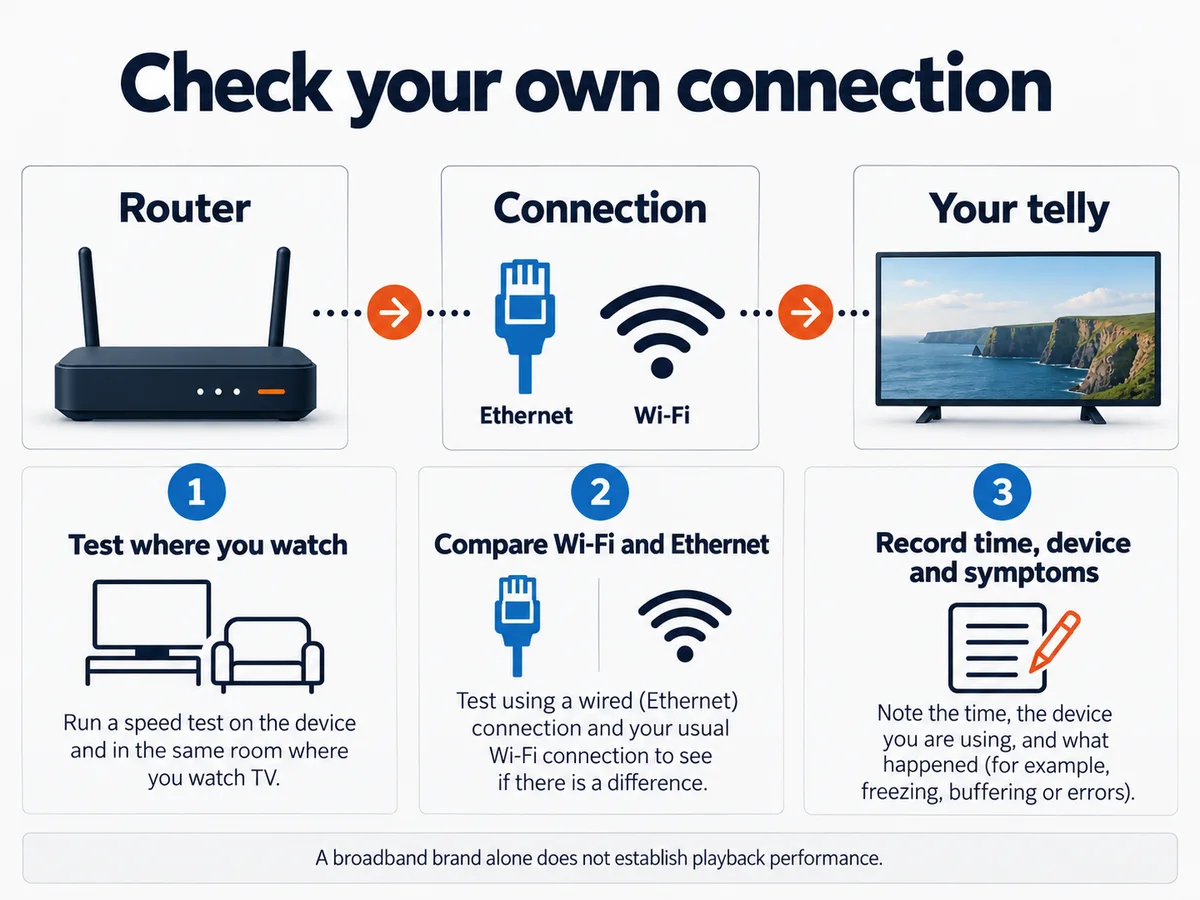
Compare what is available at your address, the contract's speed information and your own results. This guide does not contain a controlled IPTV performance test of Eir, Virgin Media, Sky, Vodafone or other Irish providers, so it cannot rank them or assign them specific buffering problems.
Use ComReg's Broadband Checker to look up fixed broadband options for your Eircode or address. For a rural property in the National Broadband Plan, NBI's network map shows inclusion and estimated rollout status; dates can change. Check availability at the property rather than assuming a city or county average. An availability listing does not measure your evening Wi-Fi or guarantee stream playback.
advertised Irish broadband examples
Official provider pages checked 21 October 2026 show the following examples. This is not a complete market comparison or a recommendation to buy a faster package. Advertised line speeds are not measured Wi-Fi speeds or BingeBear requirements; availability, access technology, equipment and contract terms depend on the address.
| Provider reference | Advertised speed examples | Check before comparing |
|---|---|---|
| eir fibre and Wi-Fi 7 | The page advertises 5 Gb broadband | Use eir's address/coverage check to establish the offer available at the property |
| Virgin Media broadband | The provider lists 500 Mb, 1 Gb, 2 Gb and 5 Gb tiers | Check the address-specific product, normally available speed, upload speed and equipment requirements |
Compare the actual contract and test on the viewing device before changing provider. A high advertised tier does not establish better playback than another provider at your address. The speed and jitter observations below are more useful than assigning a buffering score to an ISP without a controlled test.
Before changing provider, compare a wired connection with your usual Wi-Fi connection where possible. If one app or channel fails while other services work, give those details to support. If several services are slow, collect the times, connection method and test results for your broadband provider.
connection delay, jitter and packet loss
Download speed measures data carried per second; it does not describe every part of a connection. Latency is delay. A ping normally reports round-trip delay to a particular test target. Jitter describes variation in packet arrival timing. Packet loss describes packets missing at the measurement point. The IETF defines round-trip delay measurements and distinguishes loss and interarrival jitter.
| Check | What to record | What it cannot establish |
|---|---|---|
| Latency or ping | Tool, test target and reported round-trip time | Delay to every channel source or total live-picture delay |
| Jitter | The tool's variation result and whether the connection was busy | A universal pass/fail limit for every player and stream |
| Packet loss | The tool's reported loss, test duration and connection method | That the same loss occurred on the programme's delivery route |
Use these as diagnostic observations alongside playback, not as a guarantee. BingeBear-specific jitter and loss limits have not been measured for this guide. Do not buy a faster plan solely because a single ping result looks high. Compare the same test on Wi-Fi and Ethernet where supported, at quiet and usual viewing times, and note whether other apps are affected. The existing testing steps below explain what to send to support.
common buffering issues and speed fixes
Work through a few checks before buying a new router, device or broadband package:
- Pause large downloads and updates, then compare playback.
- Try Ethernet if the streaming device supports it. YouTube's official guidance suggests a wired connection as one way to help streaming.
- If using Wi-Fi, test closer to the router and compare available bands at the actual viewing position. Do not assume a different band will work better through every wall.
- Restart the device and router, and check for supported software updates. Netflix's buffering guide also recommends checking the connection and improving router placement.
- Compare another channel or app, and a lower-quality stream if offered. Note exactly what changes.
Avoid changing several settings at once: it becomes difficult to tell which one helped. A faster DNS setting or a new device should not be presented as a guaranteed buffering fix. For a fuller checklist, use the IPTV troubleshooting guide.
how to test your internet for iptv
Test where you watch, with your normal connection method. Repeat at a quiet time and when you usually watch a match or programme. Write down the date, time, device, Wi-Fi or Ethernet connection, speed result and playback behaviour.
Fast.com is one option linked from Netflix's own speed guidance. A result measures that particular test connection; it does not measure BingeBear's stream delivery or certify every service on the broadband line.
Use actual playback alongside the speed result. If a stream freezes despite a good result, record the affected channel, selected quality, time and whether another app or device has the same problem. Send those observations to support when asking for help.
rural ireland iptv speed solutions
Check the services and coverage available at the specific address. Fixed broadband, fixed wireless, mobile and satellite connections can behave differently by location and time. A national average or a neighbour's result does not establish what will work in your sitting room.
Try your existing connection before committing to new equipment or a different contract. Check data allowances and any traffic-management conditions. If the connection struggles, test a lower-quality stream and compare the result during the hours you actually watch. The rural broadband guide provides further questions to consider.
iptv data usage and fair usage policies
Data usage depends on the stream bitrate and how long you watch. An illustrative stream averaging 10 megabits per second carries about 4.5 GB in one hour: 10 × 3,600 ÷ 8 ÷ 1,000. Four hours a day for 30 days would be about 540 GB, before protocol overhead or other household use. These are decimal-unit calculations, not measured BingeBear usage.
Check the current terms of your own broadband plan. This guide does not verify a daily cap, monthly fair-use threshold or throttling policy for any named Irish provider. “Unlimited” and traffic-management conditions need to be read in the actual contract.
Evening slowdowns alone do not identify their cause. Compare services and connection methods, and ask your provider about the observations. A VPN is not a guaranteed remedy: it changes the network route and may reduce speed. This guide does not recommend buying one to solve an undiagnosed playback problem.
network optimization for iptv streaming
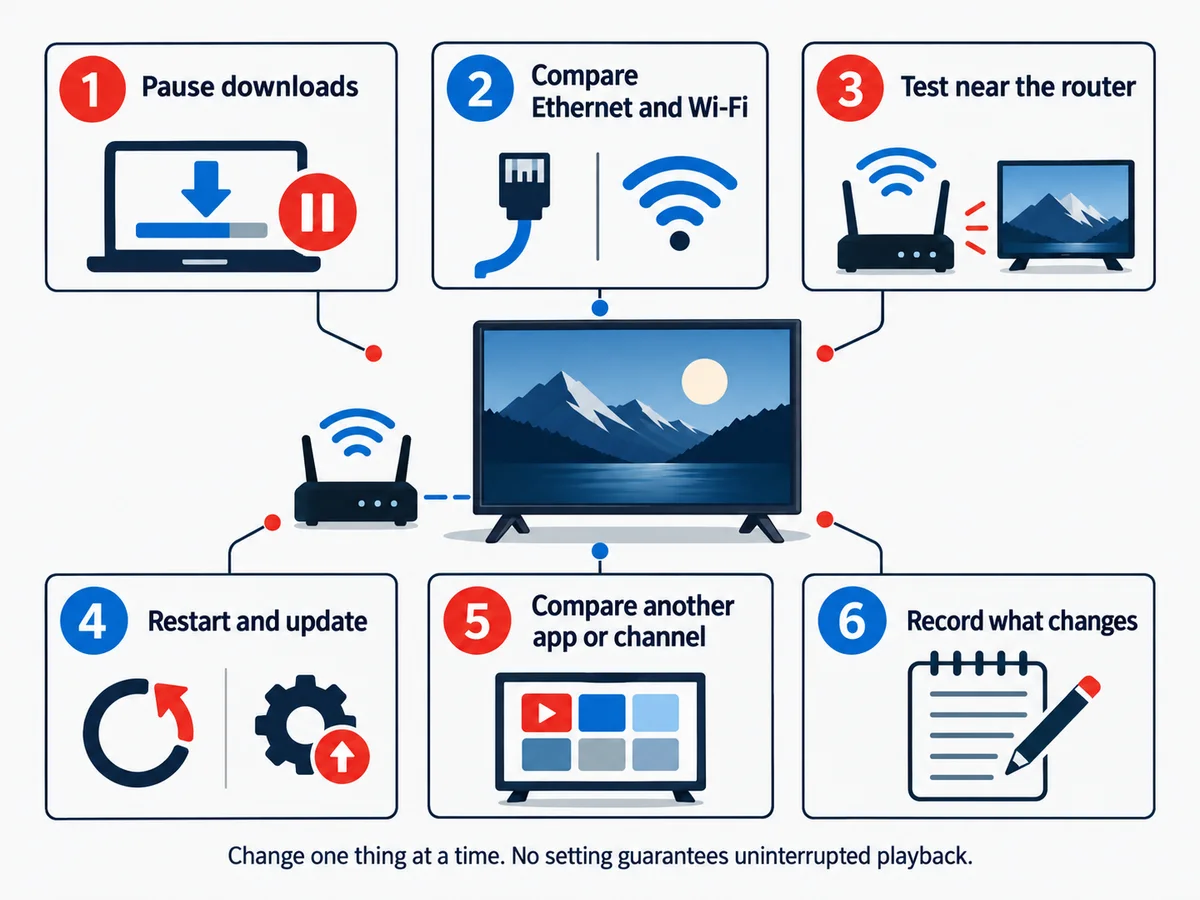
Start with connection placement, supported updates and a wired comparison. Keep notes before changing settings. If the router offers traffic-priority controls, follow its manufacturer's instructions and compare the result under normal household load. Prioritisation does not create more broadband capacity.
Avoid assuming that a new router, powerline adapter or premium cable will fix the problem. Test what you can with the equipment you have. If only one stream remains affected, provide that information to support rather than repeatedly changing the home network.
speed requirements comparison table
| Situation | Starting point | What to verify |
|---|---|---|
| One HD stream | Allow about 10 Mbps for a first test | Sustained playback on the actual device |
| One 4K stream | Allow about 25 Mbps for a first test | Stream availability, device support and playback |
| Several simultaneous streams | Add the allowances for the active streams | Other household traffic and separate accounts |
| Good speed test, poor playback | Compare wired/Wi-Fi, another app and another channel | Whether the fault follows the network, device or stream |
The first two rows are this guide's planning suggestions. The provider-specific published recommendations are in the earlier sourced table. Neither table promises uninterrupted viewing.
frequently asked questions
What internet speed do I need for IPTV in Ireland?
Start testing with about 10 Mbps for HD or 25 Mbps for 4K per stream, then check actual playback. The required bitrate varies. These allowances include some headroom and are not universal minimums.
Can I watch 4K IPTV with 50 Mbps broadband?
A connection delivering that speed at the viewing device gives room above this guide's single-stream 4K allowance. It still needs a compatible device, an available 4K stream and a playback test. Other household activity uses the same connection.
Does IPTV need 5-10 Mbps upload speed?
This guide has no verified basis for that universal requirement. Watching video mainly consumes download bandwidth. Test the actual stream and household connection rather than treating a fixed upload figure as a purchasing requirement.
Do Irish ISPs require a particular streaming codec?
Check the stream, viewing app and device together. A codec is the format the player needs to decode; Android's supported media formats, for example, vary by platform version and device type. This guide has no evidence of a codec requirement shared by Irish broadband providers. Ask which format the stream uses and check player compatibility; a faster broadband package does not establish that the device supports that format.
Do I need fibre broadband?
Choose based on the connection's actual behaviour, simultaneous household use and contract terms. Fibre may provide more capacity, but the connection type alone cannot guarantee playback or eliminate every evening slowdown.
Why does IPTV buffer when a speed test looks good?
The test and the video stream are different connections. Check Wi-Fi reception, the viewing device and other household activity, and compare another app or channel. Give support the times and exact symptoms.
How much data will I use?
Use the average bitrate and hours watched to estimate it, then compare with the router's actual usage records and the broadband plan. The 10 Mbps example above calculates 4.5 GB per hour; it is not a claim that every HD or 4K stream uses that amount.
Can one BingeBear account stream on several devices at once?
One account plays on one device at a time. Ask Joe about separate subscriptions or the three-account bundle for simultaneous viewing, and check the current prices and terms.
Related reading
Start a free 24-hour trial on your own device and broadband, with no card needed. Ask Joe to confirm any essential channel, player or programme before subscribing.